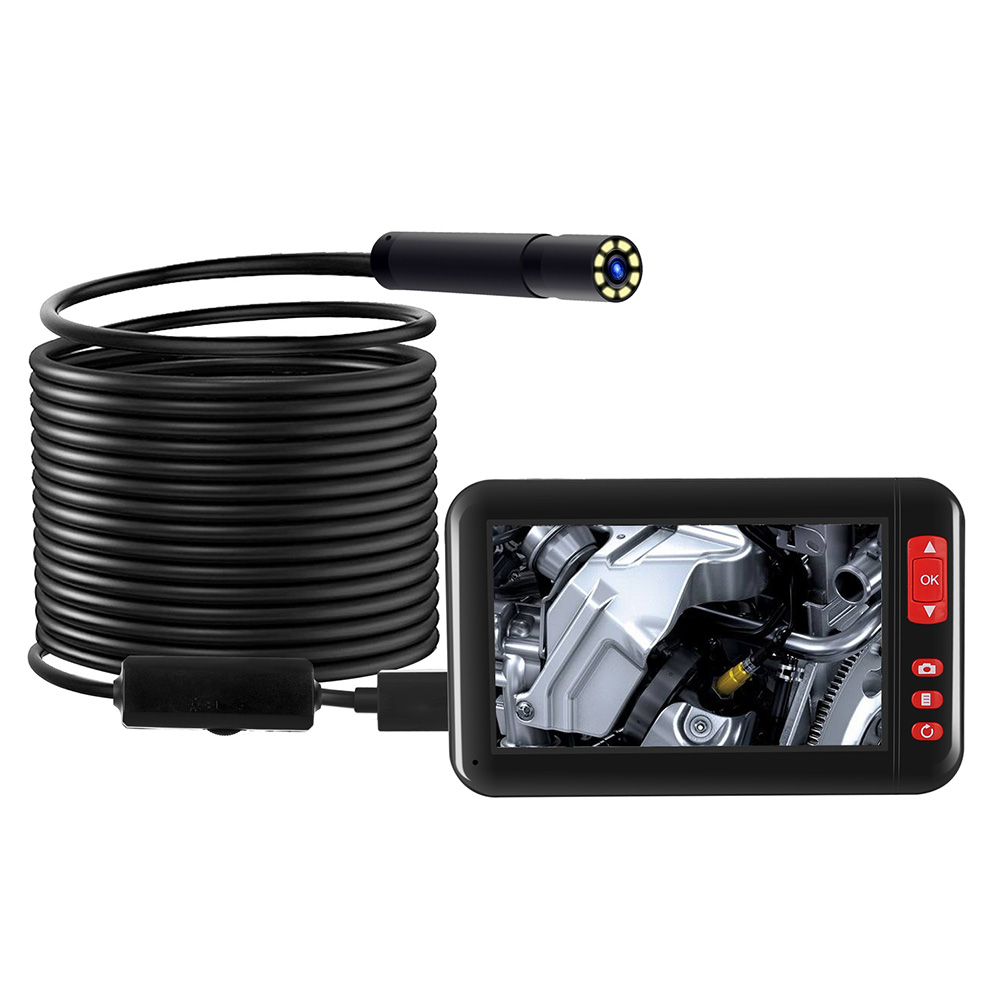

4.3inch HD 1080P Display Screen Industrial Endoscope Borescope Inspection Camera with 8 LEDs, 8mm Lens, 2000mAh Rechargeable Lithium Battery, and 5m Cable Length

4.3inch HD 1080P Display Screen Industrial Endoscope Borescope Inspection Camera with 8 LEDs, 8mm Lens, 2000mAh Rechargeable Lithium Battery, and 5m Cable Length

$104.50

  • Can be widely used for automobile inspection, pipeline inspection, air conditioning inspection, object search, etc
  • 4.3in 1080P high-definition large screen display
  • IP67 waterproof function
  • Built-in 8pcs adjustable LEDs lights
  • TF card slot for taking photos or recording videos
  • 2000mAh rechargeable lithium battery
  • Soft and flexible wire
  • Plug and play, no need to download software
(0 customer reviews)

Free worldwide shipping on all orders over $50

  • 30 days easy returns
  • Order yours before 2.30pm for same day dispatch
Guaranteed Safe Checkout

4.3inch HD 1080P Display Screen Industrial Endoscope Borescope Inspection Camera with 8 LEDs, 8mm Lens, 2000mAh Rechargeable Lithium Battery, and 5m Cable Length
$104.50
Callback Form

4.3inch HD 1080P Display Screen Industrial Endoscope Borescope Inspection Camera with 8 LEDs, 8mm Lens, 2000mAh Rechargeable Lithium Battery, and 5m Cable Length,

HOW TO USE

1. Power on/off

  • Press and hold the power button for 2 seconds to turn on the device.
  • Press and hold the power button for 2 seconds to turn off the device.

2. Adjusting LED brightness

  • Press the “+” button to increase the LED brightness.
  • Press the “-” button to decrease the LED brightness.

3. Capturing photos

  • Insert a TF card into the TF card slot.
  • Press the “photo” button once to capture a photo.

4. Recording videos

  • Insert a TF card into the TF card slot.
  • Press the “video” button once to start recording a video.
  • Press the “video” button again to stop recording.

5. Viewing photos and videos

  • Connect the device to a computer using the provided USB cable.
  • Access the device’s TF card on your computer to view and transfer the photos and videos.

6. Adjusting screen brightness

  • Press and hold the “-” button for 2 seconds to decrease the screen brightness.
  • Press and hold the “+” button for 2 seconds to increase the screen brightness.

7. Waterproof function

  • The device is IP67 waterproof and can be used underwater or in wet environments.

8. Charging the device

  • Connect the device to a power source using the provided USB cable.
  • The device will automatically start charging.
  • A full charge takes approximately [insert estimated charging time] hours.

, ,
Additional information

Weight 5 lbs

Reviews

There are no reviews yet.

Only logged in customers who have purchased this product may leave a review.