
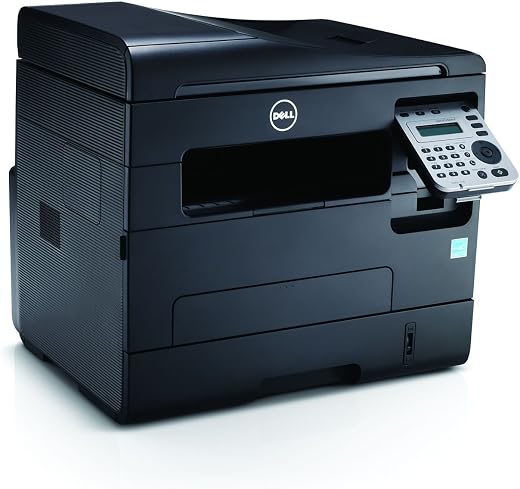


Dell Computer 1265dnf Wireless Monochrome Printer with Scanner, Copier and Fax,
- Get 4-in-1 versatility: Your team can easily print, scan copy and fax with the multifunctional Dell B1265dnf.
- Enhance efficiency: Enjoy two-sided printing, high-quality printouts, network connectivity with built-in Ethernet, high-speed printing and reliable performance.
- Print from mobile devices: It’s easy to print directly from a wide variety of mobile devices right to your Dell B1265dnf.
, , Dell





Don W Hallblade –
While the printer is a good value and the service was very good from the seller, an incomplete description caused an assumption that wasn’t true. While the printer does scan, it does not support scan to email – only scan to a document file on a computer. Also, our previous multi-function printer was able to direct faxes to email which this one does not. We’ll probably need to buy another printer as our primary fax device that has the fax to email feature along with the scan to email function.
templink –
I bought this to replace an aging yet still functioning HP LaserJet B&W laser printer. So far, I am very happy with the Dell B1265dnf. It responds more quickly than the old printer, and the output quality is just as sharp. Software/driver setup took almost 30 minutes on my Win7 box, but went smoothly. Dell printer manager software allows you to control most settings of the device from the PC instead of having to use the on-device menus. Scanning documents and photos to the PC works well. I haven’t needed to fax yet but I assume that will work just fine.
One thing I especially like is that when the unit goes to sleep (after 1 minute of inactivity), its fan turns off and it becomes completely silent.
Mark Kenyon –
I purchased this from Staples, and thought it was a good deal. But it has some flaws.
The manual paper feed will only accept one page at a time, and you have to hold it in place while it prints, or the page will fall out. There is no tray to hold it. If it isn’t seated properly, the printer will print from the default tray.
The printer likes to go to sleep. It is very quick to go into sleep mode, but some times it never wakes up. I have it networked using Ethernet cable, and at times none of the computers can communicate with it. I have to shut the printer all the way down and restart it to get them to talk again. If I am in another room and try to print (which is why I wanted a network printer) it is frustrating to have to walk in and restart the printer.
It doesn’t like small form sizes. I frequently need to print on 6×4″ forms. Since the manual feed will only take one at a time, I have to remove the paper tray, replace it with the forms, then when done, put Letter size paper in again. If I try to manually feed them in, the frequently become jammed inside.
You can select to ‘Scan to PC’ from the printer which sounds nice, but if it has fallen asleep, it will fail, since it cannot communicate with the target PC. Scanning is an issue if it goes into this Deep sleep state, and is especially difficult if you try to use Windows 8’s built in Scan feature. I have gotten Windows 8’s native scan to work maybe 2 out of 5 times.
Sum Up
So, trouble feeding manually (manual feed is practically useless to me on this machine), trouble with small forms, and going into deep sleep and not waking up. Other than that, it’s a nice device.
I would have taken it back, but I waited too long, so I’m stuck with it.
I have 1 PC running Windows 7, a Netbook (Win8), and a tablet (Win8) printing over the network to the printer. I have occasionally been able to use the Google Print feature, when it hasn’t gone into Deep Sleep.
LJohnson –
Seller shipped fast and I received on the next business day. Set -up was simple. I have a Dell Vostro laptop without a disc drive and it was not an issue. Plugged it in and the printer was installed and I was using it within 10 minutes. Very easy to use too.
Judith D. –
At this point, I just began to print and so far about 10 pages that are not good copies…..Now what?
Amazon Customer –
great clarity, speed, ease of operation, and adjustable key pad is so convienient
Buckshot –
I have had this printer, scanner, copier, fax now for about 3 monthes. Finally a printer that does what it says. I use it for my home based business and personal use. Great copies, does a very good job of printing. The best part I don’t need to constantly be filling or changing print cartridges. Toner cartridge said it would do 1500 prints, right now I would say its going to be very close to making it. And the cost of replacing the cartridge saves you big bucks over those little print cartridges of other printers I have had. I would estimate I paid for this printer alone in the savings already.
Shelly Sullivan –
Great buy … scans, faxes, and copies. Bought it for my mother and she is not tech savvy–she loves it! Easy to use!