Dell UltraSharp U2723QE 27 inch 4K USB-C Widescreen IPS LED Monitor
Brand new and sealed
Features industry’s first IPS Black technology for brilliant color and contrast
Wide color gamut and VESA certified Display HDR 400 for true-to-life visuals
USB-C Hub for easy connectivity to Ethernet and other devices
Dual 4K monitor set up for increased productivity
Virtually borderless InfinityEdge design for edge-to-edge views
ComfortView Plus reduces blue light emissions without compromising color
Buy more, save more Buy 2–4 of this item and save 5%. Buy 5 or more of this item and save 10%. Discount is automatic in your cart on regular-priced items. It cannot be combined with coupon codes or sale prices.
Country suggested using IP or browser language; you can change it. Shipping is confirmed at checkout.
Brand new Dell UltraSharp U2723QE 27-inch 4K USB-C Widescreen IPS LED Monitor,
How to Use the Dell UltraSharp U2723QE 27 inch 4K USB-C Widescreen IPS LED Monitor
Getting Started
Unbox the monitor and remove all packaging materials.
Connect the power cable to the power connector on the monitor and plug the other end into a power outlet.
Connect your computer or device to the monitor using one of the available video inputs: DisplayPort or USB-C. Use the appropriate cable for your device.
Make sure your computer or device is powered on.
Press the power button on the monitor to turn it on.
Adjusting Settings
To adjust the settings of the monitor, press the menu button located on the control panel at the bottom of the monitor.
Use the navigation buttons to scroll through the different options in the menu.
Press the menu button again to select an option.
Use the navigation buttons to adjust the selected option.
Press the menu button to exit the menu and save your changes.
Using USB-C Hub
The monitor features a USB-C hub that allows you to connect various devices.
To use the USB-C hub, simply plug your USB-C compatible devices into the USB-C downstream port on the monitor.
You can connect devices such as smartphones, tablets, keyboards, mice, and external storage devices.
The USB-C hub also allows for fast data transfer speeds and can charge compatible devices.
Adjusting Display Settings
To adjust the display settings, press the menu button and navigate to the “Display” or “Picture” options in the menu.
From there, you can adjust settings such as brightness, contrast, color temperature, and more.
Experiment with different settings to find the best viewing experience for you.
Press the menu button to exit the menu and save your changes.
Additional Features
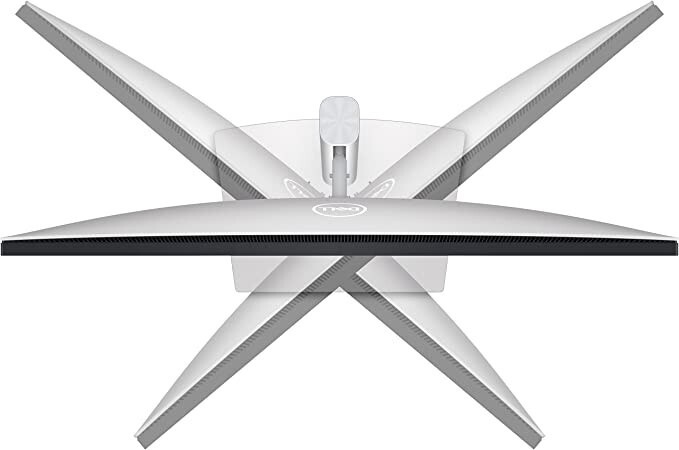
This monitor supports a 4K resolution, providing exceptional clarity and detail in your visual content.
It also features IPS LED technology, offering wide viewing angles and accurate colors.
Enjoy the borderless InfinityEdge design that provides an immersive viewing experience.
If you have any further questions or need assistance, please consult the user manual or contact Dell customer support.
, , Dell
Weight
5 lbs
Manufacturer Warranty
1 Year
Screen Size
27 in
Brightness
400 cd/m²
Refresh Rate
60 Hz
Video Inputs
DisplayPort, USB-C
Color
MPN
U2723QE
Aspect Ratio
16:9
Brand
Display Type
IPS LED
Maximum Resolution
3840 x 2160
Contrast Ratio
2000:1
Model
UltraSharp U2723QE
Features
Flat Screen
Product Line
UltraSharp
Reviews
There are no reviews yet.
Only logged in customers who have purchased this product may leave a review.














Reviews
There are no reviews yet.