
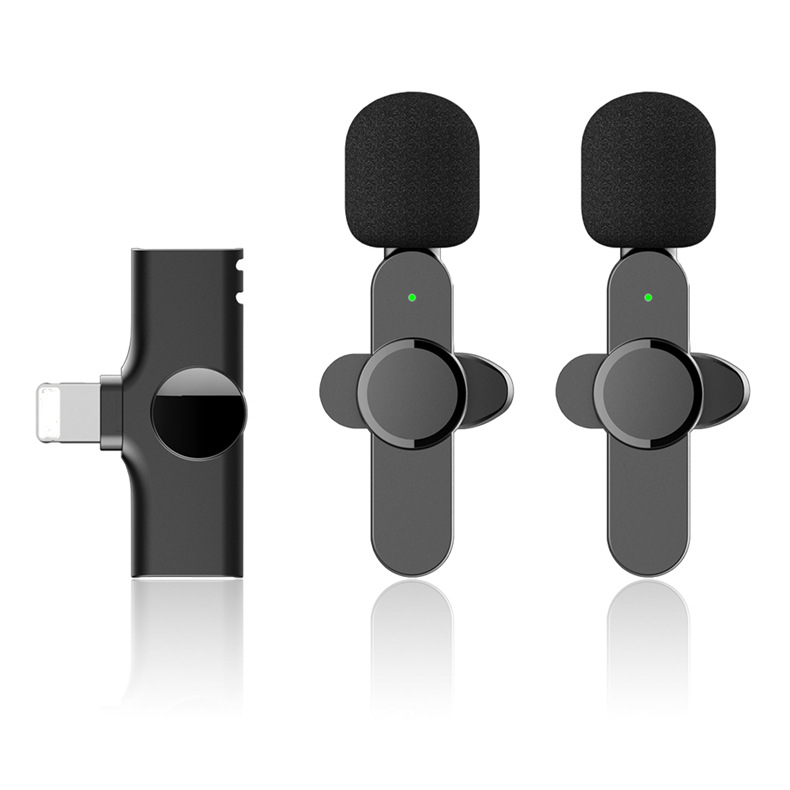

One for Two Wireless Clip-on Lavalier Microphones Plug-and-Play Mic for Interview, Vlog, Live Streaming, and Video Recording (Black),
How to use the Wireless Microphone
Step 1: Connect the Receiver
- Plug the receiver into the audio input port of your device (such as a smartphone or camera).
- Ensure the receiver is securely connected and not loose.
Step 2: Power On the Microphone
- Turn on the wireless microphone by pressing the power button.
- Wait for a few seconds until the microphone and receiver automatically pair with each other.
Step 3: Positioning
- Place the wireless lavalier microphone on your clothing using the included clip.
- Ensure that the microphone is positioned close to your mouth for the best sound quality.
Step 4: Adjusting Settings (if necessary)
- Check your device settings to adjust the microphone input level if needed.
- Make sure the microphone volume is suitable for your recording environment.
Step 5: Start Recording
- Begin your recording, whether it’s an interview, vlog, live stream, or any other type of video recording.
- Speak clearly into the microphone to capture your voice effectively.
Step 6: Charging (if necessary)
- If the microphone battery is low, you can charge it using a compatible charging cable.
- The receiver also has a reverse charging function, allowing you to charge your phone while recording.
Step 7: Power Off
- When you’re finished using the wireless microphone, press and hold the power button to turn it off.
- Unplug the receiver from your device.
Enjoy the wireless freedom and high-quality sound provided by the Wireless Microphone Clip-on Mic Plug-Play Lavalier Microphones!
, ,

Reviews
There are no reviews yet.